Bottom line
- A free VPN can be safe, but only when the company says plainly how it pays for its servers, and most of the free VPNs in the app stores never do.
- Before you install anything, I would check who owns the app, how it earns money, whether it has a real privacy policy, and which permissions it asks for. A VPN that wants your contacts or call history fails at the first look.
- Among free plans that publish their business model, Proton VPN’s is the one I would start with: no ads, no data cap, one device, and servers in 10 countries that you do not get to pick.
The short answer
Is a free VPN safe? Sometimes, and the answer depends on the business model more than on the app itself. Servers cost money to run, so somebody is paying for a free VPN: its own paying customers, advertisers, or in the worst cases the people whose data it collects. If you can see which of those it is, you can judge the risk. If you cannot find out, I would treat that silence as the answer.
This guide gives you a short checklist to run before you install, then a straight look at the free plan I think passes it. It is written for someone who wants a VPN for public Wi-Fi or a little more privacy and is not ready to pay yet. It is not a guide to unblocking streaming or to heavy downloading, because free plans are weak at both.
How free VPNs pay for themselves
One long explainer from PCMag sorts free VPNs into three groups. The first is a limited free tier that exists to sell a paid plan. The second is a fully free app paid for by advertising. The third is a catch-all for malicious apps that collect your data without telling you.
The first group is the only one I would consider. The free tier is a sample of the paid product, and paying customers cover the bill, so the company has no need to sell what you do online. Even so, a paid tier is not a guarantee of honesty. In 2015, 47 million free users of Hola VPN found out that they had been unwittingly made part of a botnet used by a sister service called Luminati. A provider can look respectable and still be doing something you would never agree to.
Ad-supported apps work on a different trade. Ads pay best when they are targeted, and targeting needs data, so the tunnel you get is paid for with a picture of you that goes to advertisers. The same explainer describes software development kit trackers, small pieces of code inside an app that report how you use it. It also notes that on a phone, the permissions you grant can open up call history, contacts, location and calendar. A 2025 report from the security firm Zimperium uncovered hundreds of shady free mobile VPNs that track users and sell their data to brokers.
The third group is worse. Apps that only pretend to be VPNs are mostly found outside the official stores, and they can carry spyware or ransomware. Some appear to work normally while they steal from the background. CNET points to a study that found nearly two-thirds of free VPNs put your data at risk, and says a popular free Chrome VPN was caught taking screenshots.
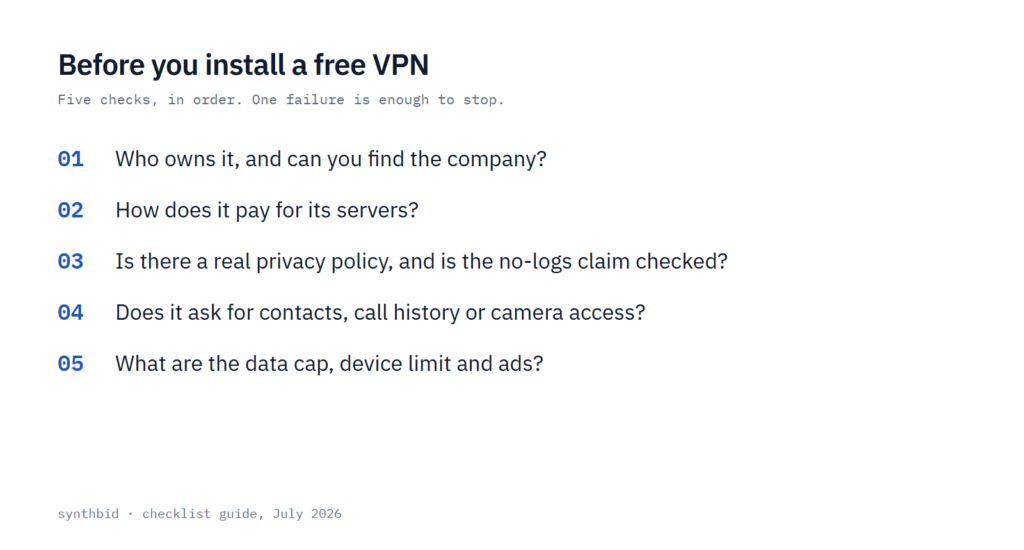
The five checks, in order
Run these before you press install. One failure is enough to stop, because none of them can be fixed by the app later.
- Who owns it. Find a company name, a country and a contact address on the vendor’s own site. Many free VPNs appear one week and vanish the next, so if a quick search turns up nothing about the company, I would not download it.
- How it makes money. Look for a paid plan that the free one is a sample of, or a plain statement of the business model. A “free forever” app with no paid tier and no explanation is paid for by ads or by data.
- The privacy policy, logs and audits. No policy means no install. If there is one, read what it collects and who it shares with. A no-logs claim is only a claim until an independent party has checked it, so I would look for a published audit and treat an unchecked promise as unproven.
- Permissions. A VPN has no need for your location, phone number, call logs or camera. If the app asks for them, decline, and uninstall it.
- Limits and ads. Find out the data cap, the number of devices, how many servers you can choose from and whether the app shows ads. Better to know before you build a habit around it.
Policy, permissions and where the app comes from
The privacy policy is the quickest filter. If you cannot get hold of one, or a search for the company returns no details at all, that is a bright red flag. If there is one, skim for the sections on what is collected, how long it is kept and which partners receive it. A free VPN that shares data with an advertising partner is telling you its business model, and it is not the one you wanted.
Permissions are the second filter. A VPN carries your network traffic. Nothing about that job needs your contacts, your call log or your camera, which is my reasoning for why the permission screen is such a reliable test. If a free app wants them, the data is probably the product.
Where you get the app matters as well. Google Play now shows a Verified badge on trusted VPN apps, and the explainer points out how many unverified apps still crowd the first pages of results for “free VPN”. Copycats often borrow the name of a well-known provider, and apps that get removed or called out tend to return under a new name and logo. I would go to the provider’s own website, follow its link to the store, and check that the publisher name matches. If an app looks fine on paper and still feels off, take the hint and skip it.
If you have already installed something that fails these checks, uninstall it. My guide on how to remove personal information from the internet covers what to do about data that may already be out there.
The limits you feel even with a safe one
Passing the safety checks does not make a free plan a full VPN. Reviewers list the same trade-offs again and again, and most of them follow from the business model.
Free plans usually come with fewer features. Reviewers note they often lack split tunneling and the ability to get around regional blocks. Some use weak or outdated encryption, with the old PPTP protocol as the example, which is a reason to avoid them on its own. Many cap how much data you can move, and the allowance usually resets every month, so heavy video use can leave you without a VPN until the cycle starts over.
Crowded servers are the other common complaint. When a service is free, people flock to it, and overloaded servers mean slower speeds, higher latency and buffering. Having fewer servers to pick from makes a reliable connection harder to find. If speed is your main worry, see does a VPN slow down your internet, which sets a paid service as the baseline.
Ads and pop-ups round out the list. They are annoying in themselves, and in the worst case they are the visible sign of the data trade described above. I would count an ad-supported free VPN as failing the second check whatever else it offers.
A free plan that publishes its business model
The free plan that comes out best against these checks is Proton VPN’s. Proton’s own free VPN page says the free plan is supported by paying users and invites people to upgrade to support the mission. PCMag asked the company how it covers the cost, and the general manager’s answer, as the article reports it, was that paying customers fund the free tier and no outside investors need to be satisfied. CNET calls it the only free VPN it endorses, because it avoids the problems on its list.
What you get is deliberately narrow, and the table shows the gap between free and paid. The free plan has no ads and no logs, no data cap, and it does not ask for a credit card. It covers one device at a time and connects you to servers in 10 countries that the app selects for you.
| Proton Free | VPN Plus | |
|---|---|---|
| Price | $0.00/month | $3.49/month on the two-year plan |
| Devices at once | 1 device | 10 devices |
| Servers | Servers in 10 countries, randomly selected | You choose the server |
| Speed | Medium | Highest |
| Streaming and P2P | Not listed | Included |
| No logs and no ads | Included | Included |
Prices from Proton VPN’s pricing page, checked July 2026.
The sources agree on most of this but not on speed. The free page says there are no data or speed limits, while the pricing page labels the free speed as medium and the paid speed as highest. I read that as no cap on how much you use, but not the fastest lane. For browsing on public Wi-Fi that is enough, and for streaming it is not. The pricing page also leaves streaming and P2P out of the free plan.
Two cautions. First, the free page is Proton describing itself, so I would weigh the outside coverage more heavily, and my longer view of the company is in my Proton VPN review. Second, the paid plan that funds the free one reprices. The first 24 months of VPN Plus cost $83.76, after which it renews at $83.88 per 12-month term, which works out at $6.99 a month. Staying on the free plan costs nothing, and you can ignore the upgrade prompts until you need more.
If you are comparing several free options, my best free VPNs roundup covers the trade-offs of each. If you decide a free plan is not enough, my Mullvad review covers a paid service with one flat price.
What not to do
- Do not install the first result for “free VPN” in a store. Search for the provider by name and follow the link from its own site.
- Do not grant location, contacts, call history or camera access to a VPN app, even if the app says it needs them to work.
- Do not treat any VPN as a shield for what you type into forms or hand to apps. A VPN does not stop you giving personal details away yourself.
- Do not rely on a free VPN for streaming or large downloads. The limits above make it the wrong tool, and a free plan that pretends otherwise is a warning sign.
- Do not assume a good record lasts. Re-run the checks if the owner, the terms or the permissions change.
FAQ
What is the risk of using a free VPN?
The main risks are that the app collects and sells your data, shows intrusive ads, uses weak encryption, or carries malware. Even a safe free plan comes with limits such as a data cap, slower servers and fewer locations.
Are free VPNs trustworthy?
Some are, and most are not. The ones I would trust are limited free tiers from a company that earns its money from paid plans and says so. Ad-supported apps with no paid tier fail the second check, and anything that asks for call logs or camera access fails the fourth.
Is Proton VPN’s free plan really free?
Yes. The pricing page lists it at $0.00 a month and says no credit card is required. The cost shows up as limits: one device, servers in 10 countries chosen for you, and medium speed.
Is a free VPN good for streaming?
Not usually. One review says free VPNs often cannot get around regional restrictions, and Proton’s pricing page lists streaming as a paid feature only. If streaming is the reason you want a VPN, expect to pay.