Bottom line
- Yes, every VPN costs you some speed, and the size of the hit varies: one published guide says it can reach 50% or more, and the same guide says a fast VPN can be hard to notice during everyday browsing.
- Encryption is the cost you cannot avoid, but the distance to the server, how busy it is and the protocol you pick are all things you can change in a few minutes.
- Games and video calls feel the delay first, so I would test two or three nearby servers, try a faster protocol and turn on split tunneling before deciding the VPN is the problem.
The short answer
Yes, a VPN slows your connection down. Your traffic is encrypted, sent to a server in another place and sent back, and each of those steps takes time. How much you lose depends on the provider, the server and what you are doing, so nobody can honestly promise you a figure before you try it.
The worst case is large. One published guide says speeds can drop by 50% or more, and its summary says a VPN can cut speeds in half. The same guide says the hit can be close to unnoticeable for general internet use when the VPN is fast, and that gaming, streaming and video calls are where you feel it.
Two published guides, one from PCMag and one from CNET, are the backbone of this page. They agree on most of the fixes: a closer server, a faster protocol, split tunneling, a wired connection and fewer background apps. One of them says it was made possible in part by Proton VPN while stating that it was written independently, so I give the most weight to advice that both guides share.
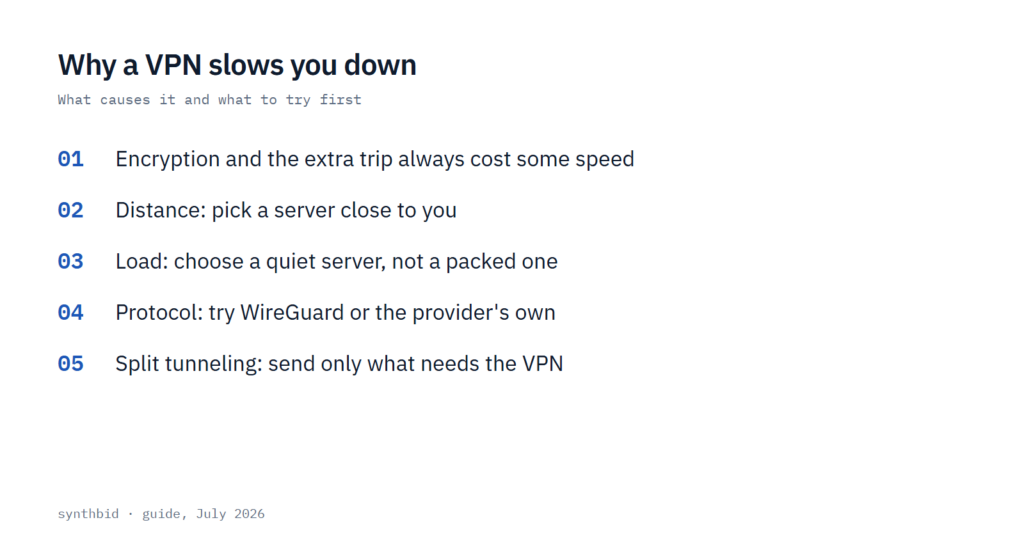
What slows a VPN down
There are four causes, and I find it helps to split them into the one you cannot change and the three you can.
Encryption and the extra trip are built in. One guide says it takes time to encrypt and decrypt your traffic and for your data to make the round trip to the VPN server and back, and that there is no way around it. A well-run service keeps that cost small, but it never reaches zero.
Distance is the cause you feel most directly. A VPN is a tunnel between your device and a remote server, and a shorter distance means a faster transfer. One guide’s example is a reader in Boston, who should see better speeds from a server in New York City or Montreal than from one in Sydney or Tokyo.
Server load is the third cause. When too many people use one server it can get overloaded and your speed takes a hit, and one guide adds bandwidth as a further factor to weigh next to distance and load. A server near you that is packed can be slower than a quiet one a little farther away, so I would not choose on distance alone.
The protocol is the fourth. It decides how your data is encrypted and sent, and different protocols trade speed against security. That is why the same VPN can feel different after one settings change.
What to expect, by activity
Speed and delay are two separate things, and a VPN touches both. One guide ties slower searches and page loads to latency and calls it the cost most VPN users pay for the added privacy and the ability to get around regional limits. I would expect delay to matter most when you are doing something live.
| Activity | What the guides say | What I would try first |
|---|---|---|
| Browsing and email | The hit can be close to unnoticeable on a fast VPN | Leave the defaults and pick the nearest server |
| Streaming | Slow VPN speeds can bring buffering and poor video quality | A close, quiet server, and split tunneling if you do not need another country |
| Video calls | You want the call to stay smooth and stable, so speed matters | A wired connection and a nearby server |
| Online gaming | A delay of even a few milliseconds can decide a match | The closest server, a fast protocol, and only the traffic you need in the tunnel |
None of this gives you a number for a named service. The guides behind this page do not measure any one VPN, so I will not quote a percentage for a provider on this page. Services differ, and the speed tests cited in my NordVPN review and ExpressVPN review show how far apart they can be, so I would read a review before paying for a long plan.
How to get your speed back
I would work through these in order, because the first few cost nothing and cover most problems. Run a speed test between steps so you know which change helped.
- Pick a nearby server. Try two or three close to you and keep the fastest. Some apps have a speed test built in, and a standalone site such as Ookla Speedtest works too.
- Choose a quiet server. Some providers show the current load on each server, and a lighter load generally means faster speeds. If yours does not, connect to a few and compare.
- Change the protocol. WireGuard or the provider’s own protocol is the usual place to start, and the next section covers where the guides differ.
- Turn on split tunneling if the app has it, so that only the traffic that needs the VPN goes through it.
- Use an Ethernet cable if you can. Wi-Fi usually has several devices at home sharing one wireless channel, and that competition can make a connection unstable.
- Close apps you are not using, update the VPN app and restart your router and your devices. It is dull advice, and I would still do it before paying for a different service.
Choosing a protocol
This is where the two guides pull slightly apart, so it is worth a closer look. PCMag says to choose WireGuard or OpenVPN if your VPN supports them and to make one the default, and to try a provider’s own protocol first when it is built on those. CNET agrees that WireGuard and provider protocols can be faster, and names ExpressVPN’s Lightway and NordVPN’s NordLynx as examples.
The difference is in the caution and in the fallback. The same guide warns that the newer protocols have been tested in the wild less than OpenVPN, so it would not make them the first choice for critical VPN use, and says that with OpenVPN you should pick UDP over TCP for speed, because TCP waits for confirmation of each packet. For the case where neither WireGuard nor OpenVPN is offered, the other guide suggests TCP, since its reliability gives smoother connections even though it can be slower than UDP. That is not a strict conflict, but one guide puts speed first and the other puts steadiness first.
My rule is simple. I would start with the default, switch to WireGuard or the provider’s own protocol if a speed test shows a gain, and fall back to TCP only if the connection keeps dropping. If an app offers PPTP or L2TP, one guide says to avoid them because they are old and less secure. Not every service lets you choose at all: my Mullvad review covers one with a single protocol.
Split tunneling and free plans
Split tunneling lets you choose which apps or sites use the VPN while everything else runs on your normal connection. One guide gives the example of a person who only needs the VPN for certain browser domains and watches Netflix outside it, so the streaming stays fast. The other turns it around: if you use the VPN for streaming, send only that traffic through it and your online gaming is not slowed.
The trade is that anything outside the tunnel is not encrypted by the VPN. One guide describes the rest of your traffic as going unencrypted through your regular internet connection. I would keep banking, work logins and anything private inside the tunnel and move only heavy, low-risk traffic outside it.
A free plan is a common reason for a slow VPN. One guide says free services often limit your data or the number of servers, and that a paid service may give you a location closer to you. My list of the best free VPNs sets out what free costs you.
What not to do, and when this does not apply
- Do not pick a server by country name alone. Distance, load and bandwidth all count, and the nearest server is not always the quickest.
- Do not switch to PPTP or L2TP to chase speed. They are old and less secure, so the saving is not worth it.
- Do not make a brand-new protocol your only option for something critical. It may be fast, but it has had less time to prove itself.
- Do not put sensitive traffic outside the tunnel just to gain speed.
This advice has limits. Sometimes you cannot pick the nearest server, for example when you want to stream from a specific country or reach a game server in a particular place, and one guide says as much. In that case the other fixes matter more, and I would accept some slowdown as the price of the location.
It also does not apply if your connection is slow with the VPN off. Restarting the router, using a wired connection and closing background apps help either way, so check the line first before you blame the VPN.
FAQ
How much slower is the internet with a VPN?
It varies. One published guide says the loss can be 50% or more, while the same guide says a fast VPN can be close to unnoticeable for general use. The only figure that counts is yours, so run a speed test with the VPN off and then on, using a server near you.
What is the downside of using a VPN?
For speed, the downside is slower transfers and added delay, which gaming and calls notice most. Free plans may also limit your data or your servers. Price and trust in the provider are the other side of the choice, and I cover them in my reviews, starting with the best free VPNs.
Is it a good idea to put a VPN on your router?
The two guides behind this page do not cover routers, so I have no sourced verdict. As I understand it, a router VPN sends every connected device through the tunnel, which is the opposite of the split tunneling both guides recommend for speed. I would consider it only if you want every device covered and have a fast server nearby.