Bottom line
- Malwarebytes Free only scans when you ask. Real-time protection, scheduled scans and quick or custom scans belong to the paid plan.
- The paid antivirus caught 99% of malware samples in one published test but blocked only 83% of malicious downloads from live malware pages, so its record is strong in places and patchy in one.
- Standard lists at $59.99 a year for 3 devices, and the page showed a first-year sale price of $35.99 when I checked, so I would plan around the list price at renewal.
What works
- Very light on system resources, including while it scans
- Near-perfect malware detection, and every ransomware sample removed in one set of tests
- Browser Guard is free and filters phishing and malware pages
- A 60-day money-back guarantee on the pricing page
What doesn’t
- It blocked only 83% of malicious downloads in one test
- A short independent lab record, with a high count of false positives in one lab test
- No firewall, password manager or parental controls in the paid antivirus
- Plans cover 3 devices by default, and extra devices are priced steeply
What you get free and what you pay for
Malwarebytes began as a scanner that people ran next to their main antivirus, and it now sells a full range of plans. The free version still exists and is still useful, but it works differently from the paid one, and most of the confusion around this product comes from mixing the two up.
Malwarebytes Free scans only when you start a scan. It has no real-time protection, so it does not check a download as it arrives. It does include the Browser Guard extension, a digital footprint report that lists the data breaches your email address appeared in, and a Tools page. One review also lists a separate free tool, AdwCleaner, for removing adware.
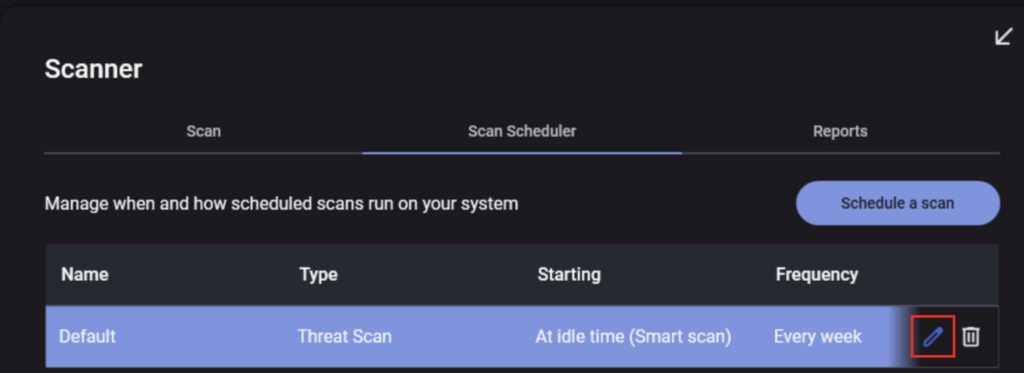
The paid antivirus adds real-time protection. Quick scans, custom scans and scan scheduling are also paid-only, and the scheduler can run hourly, daily, weekly or monthly, or at every restart. By default a scheduled scan waits until the PC is idle, and one review found that installation creates a weekly scan on its own.
Names can confuse. Some reviews call the paid antivirus Premium Security, while the pricing page lists it as Standard, and I treat them as the same product. Above Standard, Plus adds a VPN, and a top tier adds identity protection and data removal.
How well it protects
The malware results from PCMag’s own tests are strong. The paid version quarantined every sample but one before it could launch, which came to 99% detection, and it removed every ransomware sample when all its protection layers were on. One quirk: its on-access scanning acts just before a program launches and not when a file first appears, so it can look less eager than rivals that scan on sight.
The weaker result is web protection. In a test that opens live malware-hosting URLs, it blocked 83% of the malicious downloads, which the reviewer placed in the lowest quarter of current products, while four others reached 100%. Phishing protection comes from Browser Guard, which caught 96% of the fraudulent pages and beat the protection built into three browsers by an average of 20%. I read those figures together as a good filter with a gap in it.
Independent lab results are thinner than for most rivals, and the reviews disagree about how thin. One says the latest reports from AV-Test, AV-Comparatives, MRG-Effitas and SE Labs do not include Malwarebytes, and that only AVLab covers it, with a perfect 100% score. CNET and another review instead cite results from the second of those labs, and the first of them adds that AV-Test has not tested the product since 2023 and that the company questions how that lab works. Malwarebytes also won an AVLab Product of the Year award in 2025. I cannot settle the disagreement from the pages, so I treat the lab record as real but short.
Where the numbers exist they are good. In the September 2025 AV-Comparatives results, one review reports online detection of 98.8%, online protection of 99.88% and offline detection of 94.7%. Another reports 98.3%, 99.59% and 92.4% for the same three measures in March 2026, with 23 false positives that it calls high. In the February and March 2026 real-world test it stopped all 200 test cases but raised 20 false positives, the second highest among 20 products.
A high false positive count means more chance that a legitimate program gets flagged, which matters if you run niche or older software. The Detection History screen keeps an allow list for items you approve after a flag, so a mistaken block is a minor chore and not a lockout.
Everyday use and system impact
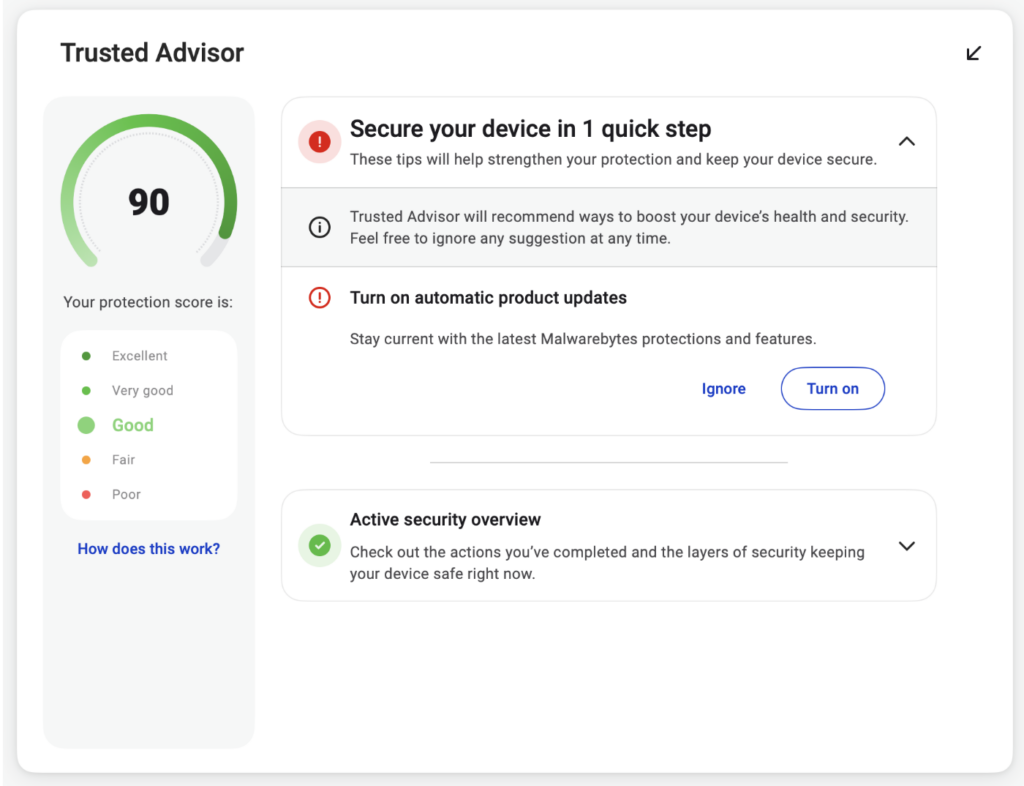
The interface is the simplest thing about it. The dashboard has a Scanner, Detection History and Real-Time Protection, a rating for how fully you are using the app, and a panel for the VPN if you pay for one. The settings go deep for experts, but the app itself warns that nearly everyone should leave the defaults alone.
Quick scans are quick and deep scans are slower. One review timed quick scans at three minutes or less and deep scans at around half an hour. In another, a full threat scan took four to nine minutes, and the deeper scan the app requests after finding a serious infection took about one hour and 45 minutes. The gap probably reflects what was being scanned, since the second figure comes from a machine with malware on it.
System impact is the best reason to pick it. One review saw the background app use 0% to 0.1% of the CPU and 132MB of memory. In PCWorld’s benchmarks on a budget laptop, an idle Malwarebytes cost less than 3% in an Office test and about 4% in a video encoding test, and a continuous scan cut the video encoding result by about 19%.
It runs on Windows, macOS, Android, iOS and ChromeOS. The Tools page offers a friendlier front end for Windows Firewall, a startup manager and system tweaks, but it carries experimental warnings and the tweaks work only on Windows 11. The paid antivirus has no firewall of its own, and I would not buy it for the Tools page.
Extras: Browser Guard, the VPN and identity tools
Browser Guard is the extra I would install first, and it is free even without a paid plan. It works in Chrome, Edge and Firefox, and one review also lists Safari. It steers the browser away from phishing and malware pages and blocks ads and trackers. One limit: it cannot be paused for a single site, so you have to switch it off entirely to view a page it blocks.
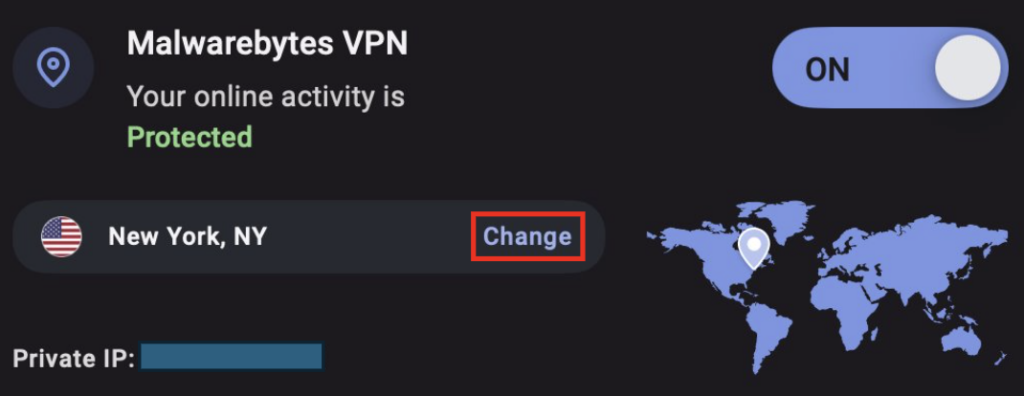
The VPN in Plus is the weakest part of the range. It runs on AzireVPN, and a published speed test measured an average speed loss of 41.89% against a recommended maximum of 25%, a figure dragged down by distant servers such as Singapore. A nearby server was fast and a US server showed minimal slowdown. Another review found speeds stable in light testing, with Los Angeles down about 5 to 7 percent and New York down roughly 26 percent. At the time of the first review the VPN had not been audited, and an audit by X41 was reported as in progress. I would pair the antivirus with a standalone service instead, such as the one in my Proton VPN review.
The top tier adds identity protection with $2 million in identity theft insurance, plus a personal data remover that works in the US only. If data removal is what you want, I would compare it with a dedicated service first, and my Incogni review shows what one costs and covers. My guide to removing personal information from the internet covers the manual route.
The password manager that comes with the identity tools is basic: one review found no bulk import and no browser extension. If you need a real one, I would start with my Bitwarden review. Scam Guard, an AI chat tool you can paste suspicious emails or texts into, is a nice touch, but the reviewer’s test email was an obvious scam, so it says little about subtler ones.
Privacy and trust
The privacy policy is the part I like most. It has plain-language summaries next to the legal text, says only the data needed to run the programs is collected, and lists Google Analytics, payment processors and certain marketing companies as the third parties it shares with. It says it will not share data with social media platforms unless you actively consent, and with governments only when the law requires it. One reviewer calls it one of the best from an antivirus company.
The VPN claims a no-logs policy, RAM-only servers and a Blind Operator mode that blocks remote access to the servers, and AzireVPN publishes transparency reports. Malwarebytes is based in the US while AzireVPN is based in Sweden, and the company says the servers follow the laws of the countries they sit in. As of the April 2026 review the VPN audit had not been published, so those claims rest on the company’s word.
So is it trustworthy? On data handling, yes, and the lab record and the unaudited VPN are the two caveats. One practical step: after installing, PCWorld suggests turning off marketing notifications under Settings, then Notifications.
Support
Malwarebytes lists free customer support, and in one review that meant a knowledge base, email and 24/7 live chat, with no phone line. The chat bot passed the reviewer to a person on the first request, the first reply came in roughly three minutes, and the whole chat took under 10 minutes. An emailed ticket took about six hours to answer, against 12 hours in the same reviewer’s 2025 tests.
From inside the app, another review found links to the user guide and support pages and an AI chatbot, and signed-in users can reach email or live chat from there. Chat is the channel I would use, and I would not count on phone help because there is none.
Pricing
| Plan | List price | First-year sale price | What it covers |
|---|---|---|---|
| Standard, 1 device | $44.99/yr | $26.99/yr | Antivirus for a single phone, tablet or PC |
| Standard, 3 devices | $59.99/yr | $35.99/yr | Antivirus for PCs, tablets and phones, plus safe browsing with a scam and ad blocker |
| Plus, 3 devices | $79.99/yr | $47.99/yr | Everything in Standard, plus a VPN |
| Top tier, 1 adult and 3 devices | $279.99/yr | $139.99/yr | Everything in Plus, plus identity protection and a personal data remover |
Prices from Malwarebytes’s pricing page, checked August 2026.
The sale prices are for the first year only, according to the page, so I would treat the list price as what renewal looks like. Sales come and go, so check the price at checkout before you rely on any figure here.
Standard covers 3 devices unless you pay more. One review reports $80 a year for five devices and $120 or $170 a year for family plans of 10 or 20 devices, which it calls steep next to rivals that cover more devices for a similar price.
Billing is the other trap. One review reports that Malwarebytes bills the 12-month term in monthly installments instead of charging upfront, which for the $59.99 plan comes to roughly $5 a month. The same review says new subscribers could take a two-year package at $105 in total.
On renewal, one review says many Malwarebytes plans have no renewal price hike, but the pricing page shows first-year prices well under list, so I would assume a step up and confirm it at checkout. The top tier is the clearest case: one review reports it renews at $280 a year after $140 in the first year, in line with the page.
Cancelling is the part to check before you pay. One reviewer found no cancel option in the account area and was told to go through customer service. The 60-day money-back guarantee on the pricing page gives you a long window to decide. One review also mentions a 14-day trial, but I did not find one on the pricing page, so I would rely on the guarantee.
How it scored
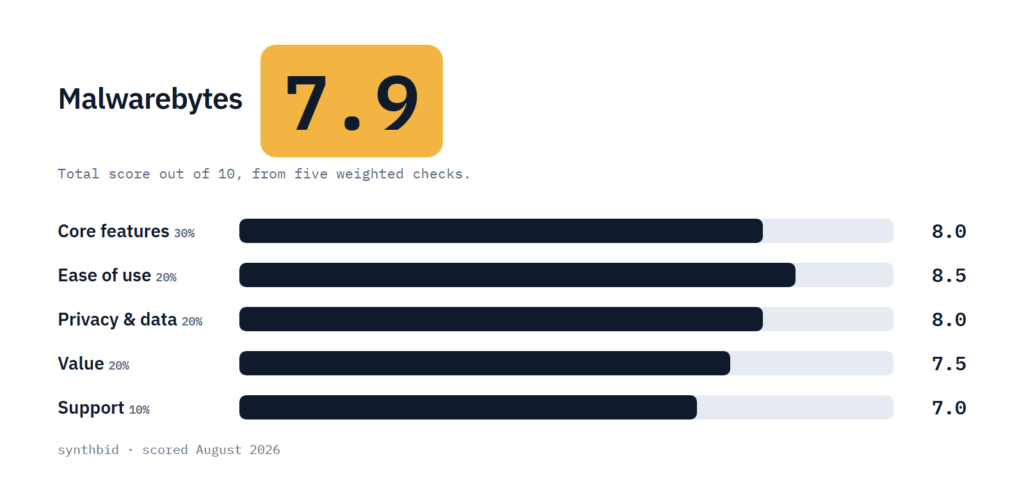
Core features, 8.0. Real-time protection that scored well in published malware and ransomware tests, scheduled scans, Browser Guard and a few Windows tools. I took points off for the weak malicious download result, a short lab record with a high count of false positives, and a feature list that one review calls light, with no firewall, password manager or parental controls.
Ease of use, 8.5. The dashboard is clean, installation is quick and the app stays out of the way. I took half a point off because the advanced scan options sit behind a menu and cancelling means contacting support.
Privacy and data, 8.0. The policy is plain and limits sharing, which is a real strength for an antivirus. I held it below a higher score because the VPN had not been audited at the time of the reviews and the policy still allows sharing with analytics and marketing companies.
Value, 7.5. The 3-device plan is fair, but extra devices are priced steeply, the first-year sale price may hide a step up at renewal, and one review tells readers not to expect much for the money.
Support, 7.0. Live chat reaches a person quickly and runs around the clock, but there is no phone line, emailed tickets took about six hours, and the reviewer had to go through support to cancel.
The How I test page explains the weights, and applying them to my five scores gives Malwarebytes 7.9 in total.
Alternatives worth a look
Bitdefender Antivirus Plus
Pick it if you want more features and a stronger lab record. One review says it packs more features than many suites and keeps perfect or near-perfect lab scores, and another notes its three-device plan renews at $70 a year.
Norton AntiVirus Plus
Pick it if you want bonus features such as online backup and a firewall. It is listed at $59.99 a year for one device and $84.99 a year for five.
Avast Free Antivirus
Pick it if you want to spend nothing first. One review lists it among the free antivirus programs you can install at no charge, and I would try a free option before paying for a basic layer.
FAQ
Is Malwarebytes trustworthy?
On data handling, yes: the privacy policy is plain and limits sharing, and the paid antivirus did well in malware tests. The cautions are a short independent lab record and a VPN that was still unaudited as of April 2026.
Is Malwarebytes free really free?
The free scanner costs nothing, but it only scans when you start it and has no real-time protection. Browser Guard is also free. Real-time protection needs a paid plan, and the pricing page lists a 60-day money-back guarantee.
What is the #1 antivirus?
No product wins every test. PCMag names Bitdefender Antivirus Plus and Norton AntiVirus Plus its Editors’ Choice for antivirus, and CNET says Bitdefender has been its top-ranking antivirus for two years running. Malwarebytes scores well in both reviews, but neither names it the top pick.
Can I run Malwarebytes alongside another antivirus?
One review warns that running several antivirus apps can cause software conflicts, and the paid version is built to be your only antivirus. The free version has no real-time protection, so it does not add a second always-on layer.