Bottom line
- Bitwarden’s free plan covers the core job: unlimited passwords, unlimited devices, passkeys and email alias support, so most people never have to pay.
- Premium costs $19.80 a year and mostly adds an authenticator, health reports, file storage and emergency access, so I would buy it for those and not to get the basics.
- Help comes by email and a help center, with no live chat or phone line, and the interface is plainer than some rivals, which is what holds the score below the top.
Bitwarden is an open-source password manager, and it suits anyone who wants a free vault that works on every phone, laptop and browser they own. The trade-off is polish and help: the free plan is generous, but the interface is not the smoothest around and you are on your own with a help center and an email form when something breaks.
What the free plan covers
The official pricing page lists what every account gets, paid or not. That includes unlimited passwords and unlimited devices, apps for browsers, phones and desktops, passkey management, a username and password generator, email alias integration and an encrypted export. Notes, cards and identities can be stored too, and Bitwarden Send handles one-off encrypted sharing.
Security basics are part of the free account as well. The same page names zero-knowledge encryption, open source code, two-step login and built-in phishing protection as core features. The practical result is that the free plan is a complete password manager and not a trial with a countdown, which is rarer than it sounds, since one review notes that other managers keep trimming their free plans or drop them for trials.
What works
- Unlimited passwords and unlimited devices on the free plan
- Open source code and zero-knowledge encryption
- Passkeys and email alias integration are included without paying
- Premium is $19.80 a year, and Families covers six people for $47.88
What doesn’t
- No live chat or phone support, only a help center and email
- Health reports and the built-in authenticator sit behind Premium
- Email aliases need a separate service and the setup takes steps
- The Premium price rose from $10 a year
Sharing and limits on the free plan
Sharing is where the free plan starts to show its edges. The pricing page says a free account can share vault items with one other user by creating a free organization, and a review describes the free plan as supporting up to two people. Families lifts that to six people, and shared collections follow the same pattern: the review says free and Premium accounts can create two collections, while Families has no cap.
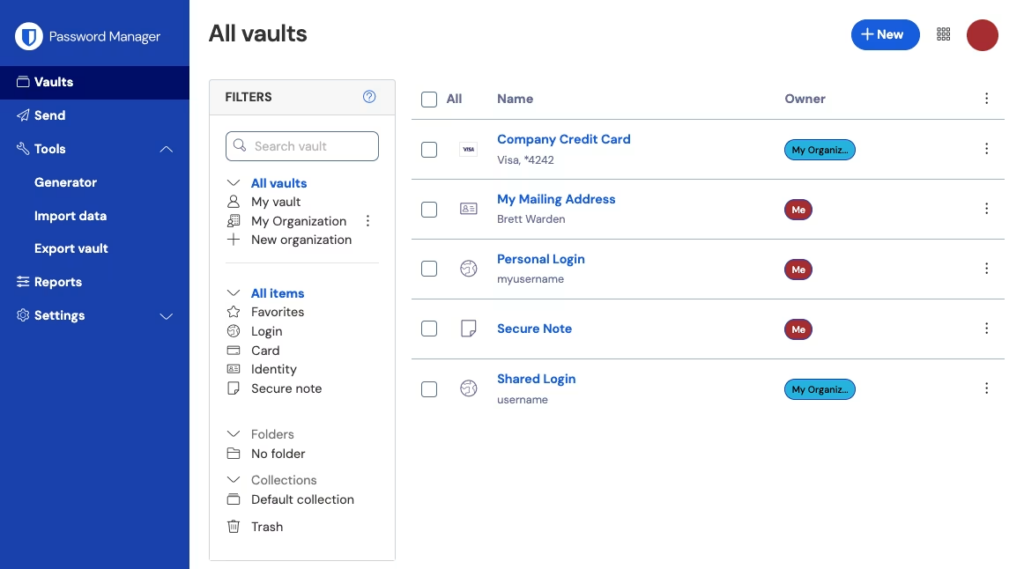
Bitwarden Send is the easier route for a one-off share, because the recipient does not need an account. Per the same review, free users can send text but not files. Premium and Families add files, and the pricing page lists file attachments of 5 GB for storing things like a passport scan.
Breach checking is the one place where the sources disagree. A February 2026 review says free users can check emails and usernames for data breaches, which is unusual, because a review notes that some other managers limit breach alerts to paying customers. An older review, updated July 2025, describes the data breach report as a Premium feature and says Bitwarden lacks breach monitoring services. I would trust the newer account and confirm inside a free vault before relying on it.
What Premium adds
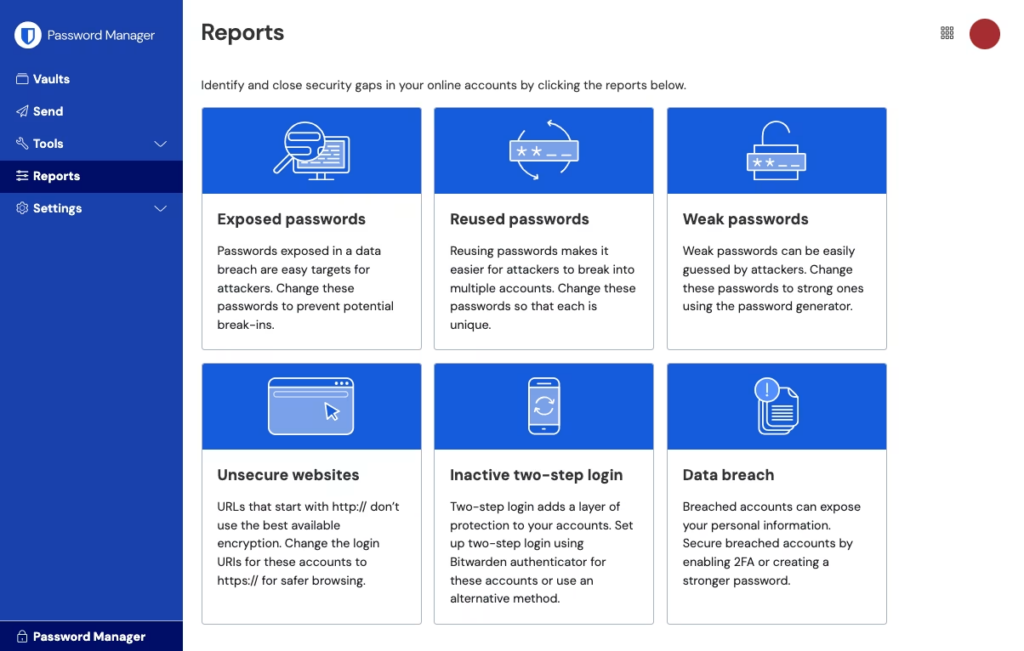
The Premium card on the pricing page lists an integrated authenticator, file attachments, emergency access and security reports. The authenticator generates the six-digit timed codes that many sites ask for, so Premium can replace a separate authenticator app. Vault health alerts and password coaching are listed as well.
The reports are the feature I would want most. The review says the paid health reporting produces six reports: exposed, reused and weak passwords, unsecured websites, inactive two-step login and data breaches. Free vaults get none of them, so you would need to find weak or reused passwords by hand.
Emergency access works in a way that is easy to miss. Only Premium customers and above can send emergency access requests, but a person on the free plan can be named as the recipient. A free user can therefore be the trusted contact for a paying relative without paying anything.
Priority support is on the Premium list too, although the page says email support is available to everyone. If you already use a separate authenticator app and keep your own backups, I would stay on the free plan and spend nothing.
Apps, browsers and daily use
Bitwarden has Android and iOS apps and desktop apps for Linux, macOS and Windows. Browser extensions cover Brave, Chrome, DuckDuckGo, Edge, Firefox, Opera, Safari, Tor and Vivaldi, which the reviewer called the longest browser list seen while testing password managers. No plan limits the number or type of platforms.
Autofill needs one setting changed. Bitwarden does not fill credentials on page load by default, citing security concerns, so you enable that in the extension settings, and depending on the browser you may also need to switch off its built-in password manager. Import is simple: many managers are supported, and a CSV file works for the rest.
The generator needs a little attention too. Its default password length is 14 characters and special characters are off by default, though it can produce passwords from 5 to 128 characters and passphrases of up to 20 words. I would raise the length and tick the special characters box before saving the first password.
On polish, the reviews split. One calls the browser extensions sleek and responsive, while the older review says the interface may be less intuitive than rival managers and that people without technical confidence may struggle with the advanced settings. I give it a middling ease score for that reason.
Security and how it handles your data
Reviews describe zero-knowledge, end-to-end encryption: the vault is encrypted on your device and the company cannot read it. One lists AES-256 encryption and says your master password is never sent to Bitwarden. The code is open source, which lets outside researchers read it, and a review says third parties audit the app regularly.
Two-step login is where the sources do not line up. The official page puts it in every account, a review says Duo and YubiKey hardware key options are for Premium, and the older review lists two-factor authentication among the advanced features of Premium. Check what your free vault offers before you plan around a hardware key.
Self-hosting is an option for people who want the vault on a server they own. The reviewer says the free plan includes the option to self-host Bitwarden Lite, and the older review notes it is aimed mainly at businesses and takes real technical work. For most readers the cloud vault is the sensible choice.
Privacy, breaches and who sees your data
The privacy answers I can cite come from the company itself, relayed in a review. Bitwarden told the reviewer that it has not had a security breach, that no vault data is stored unencrypted and that it does not sell users’ private information. It said its business model rests on paid personal and business plans, and that it cannot access a vault in an unencrypted state when governments or law enforcement ask.
Those are company statements, and the sources used here hold no separate record on breaches either way. The reviewer read the privacy policy and found no major inconsistencies with the answers. I would treat the encryption design as the main reason to trust the product, because the company says it cannot read vault contents.
One limit is worth remembering. The reviewer would not store a Social Security number in a cloud vault, however well encrypted it is, because the vault is reachable on the web by anyone who has your password and your second factor. I would apply the same rule to the things that cannot be replaced.
Support
Bitwarden offers no live chat or phone support. You get a help center, a community and a form to request contact by email, and Premium customers receive priority on email. The older review also notes active forums and good tutorials for every common feature, and it counts missing phone support as the gap.
The pricing page says email support runs around the clock for everyone, while a review says free users may find it hard to get timely help. I give support a lower score than the other four checks, because self-service is fine until a locked vault is the problem you need solved.
Pricing
| Plan | Price | Billed | Who it covers |
|---|---|---|---|
| Free | $0 | No charge | One person, unlimited devices |
| Premium | $1.65/mo | $19.80 billed annually | One person |
| Families | $3.99/mo | $47.88 billed annually | Up to 6 users |
Prices from Bitwarden’s pricing page, checked June 2026.
The monthly figures are the annual price spread over twelve months: $1.65 × 12 = $19.80 and $3.99 × 12 = $47.88. The page says prices are shown in US dollars, based on an annual subscription, with taxes not included. It does not show a month-to-month price or a separate renewal price, so I would read the checkout screen for both.
The price history matters here. PCMag reports that the long-running $10 Premium plan now costs $19.80 a year, almost double, while the older review still lists $10 for Premium and $40 for Families. The newer figures match the official page. Even so, the review puts rivals higher: NordPass at $35.88 a year and Dashlane at $59.88.
Families is the better buy once a second person is involved. Split six ways, $47.88 ÷ 6 = $7.98 per person a year, while six separate Premium accounts would cost $19.80 × 6 = $118.80 a year. If you only need to share with one person, the free plan’s sharing with one other user may already be enough.
How it scored
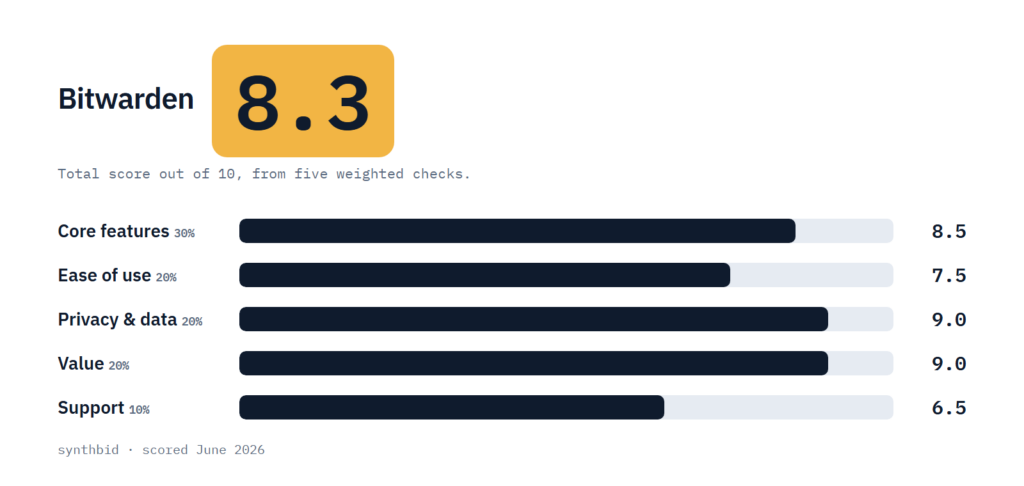
Core features, 8.5. A full password manager on the free plan, with passkeys, aliases, unlimited devices, the widest browser list in the reviews and a self-hosting option. What keeps it below the top is that the authenticator and health reports are paid and the sources disagree on breach checking.
Ease of use, 7.5. The apps work across platforms and import is easy, but autofill needs a manual setting, aliases take extra setup and the older review calls the interface less polished than commercial rivals.
Privacy and data, 9.0. Open source code, zero-knowledge encryption, third-party audits and a stated policy of not selling private information are strong points, and self-hosting is available. The no-breach statement is the company’s own, which is why it is not higher.
Value, 9.0. The free plan is complete for most people, Premium costs $19.80 a year and Families works out cheaply per person. The price rise and the missing renewal price keep it from going higher.
Support, 6.5. There is no live chat or phone support, and free users may wait on email. A help center and community are solid, but this is the weakest part of the product.
The five scores, weighted as described in How I test, add up to a total of 8.3.
Alternatives worth a look
Proton Pass
Pick it if you want aliases and password health reports built in and free. One review prefers its in-app alias approach and picks it over Bitwarden as its top password manager.
NordPass
Pick it if you plan to pay. The same review picks it as its top paid password manager, but says the free plan is limited to one account per device and has no breach scanning.
Keeper
Pick it if you would rather trial a full paid plan than live on a free one. It gives a 30-day free trial of its premium services, with no permanent free plan.
FAQ
Is Bitwarden really secure?
The sources describe zero-knowledge, end-to-end encryption, so the company cannot read your vault, and one review adds that your master password is never sent to Bitwarden. The code is open source and a review says outside researchers audit it regularly. Your own master password and two-step login still decide how safe the account is in practice.
Has Bitwarden ever been breached?
Bitwarden told one reviewer that it has not had a security breach. That is the company’s own statement, and the sources used here contain no separate record of a breach either way. Reviewers point to the zero-knowledge design as the reason the company itself cannot read vault contents.
Is Bitwarden still good in 2026?
The February 2026 review gave it 4.0, labelled Excellent, and called the free version easy to recommend. It also warns that the Premium price has increased and that rivals have improved their free plans, so the lead is smaller than it was.
What does the free plan leave out?
The authenticator, vault health reports, alerts and password coaching, emergency access requests, file attachments and priority support are paid features. Free accounts can still store unlimited passwords on unlimited devices.