Bottom line
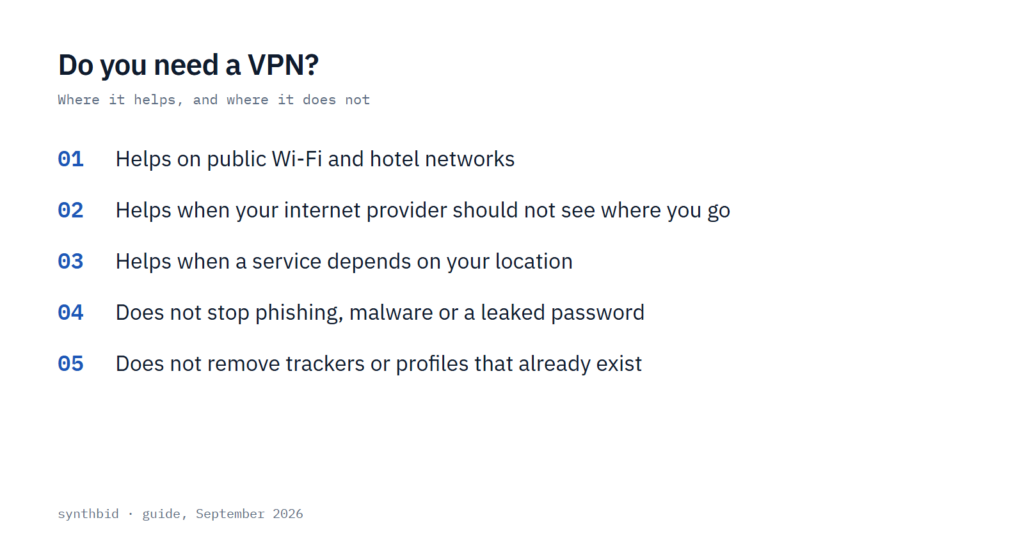
- A VPN earns its price on networks you do not control and when a service needs to think you are in another country. It does not stop phishing, malware or a stolen password.
- For your home connection the sources I read disagree. One says to keep a VPN on even there, another says most people do not need one at home, and I would decide by whether your internet provider is the party you want to keep out.
- If none of the situations in this guide describes you, I would skip the subscription and spend the effort on two-factor authentication and software updates first.
The short answer
Some people get real value from a VPN and many do not need one. The deciding factor is where you connect from and what you want to hide or reach. A VPN suits networks that someone else runs, an internet provider you would rather not show your browsing to, and services that depend on which country you appear to be in.
It is the wrong tool when the risk is a fake email, a bad download or a reused password. A VPN hides your traffic and your address, and it does nothing to make you careful. Even a phone guide published as a paid partnership with a VPN company admits that you do not strictly need one.
What a VPN actually does
A VPN sends your traffic through an encrypted connection to a server that the VPN company runs. The network you are on then sees scrambled data going to one place, and the websites you visit see the server’s address instead of yours. That is how a VPN can keep your internet provider from reading your activity, and how it can make you appear to be in another country.
It also moves the trust rather than removing it. Your provider stops seeing where you go, but the VPN company is now in that position, so I would read its logging policy before comparing anything else. Security.org makes a related point: a company that stores customer data can be breached, and nobody should treat a VPN as invincible.
One feature decides whether the protection holds when something goes wrong, and that is the kill switch. If the VPN connection fails and there is no kill switch, your provider can see which sites you are on again. I would treat a kill switch as a requirement, not an extra.
Where a VPN helps
I count three situations where a VPN does real work. They are the ones I would use to decide whether to pay.
Public Wi-Fi and hotel networks
Cafés, trains, airports and hotels are the usual case. One guide says a VPN encrypts the connection and makes data much harder to intercept on public Wi-Fi, and it adds that a phone hops between networks all day, so a VPN that stays on does the job without you thinking about it.
Security.org counts wired hotel networks among the places where it considers a VPN necessary, especially when you handle sensitive customer or business information. A federal tip from CISA, now archived, takes a stricter line: avoid open Wi-Fi for banking or shopping, and switch to mobile data if you simply must check an account while traveling. I treat the two as compatible. Mobile data is the free option for a one-off task, and a VPN is the better choice when you will be on shared networks regularly.
Your internet provider at home
At home the party you are hiding from is your provider, not a stranger on the network. PCMag calls the provider the biggest snoop on a home connection and points out that providers can sell anonymized customer data. A VPN stops the provider reading your activity, and another guide notes that private browser windows do not go that far on their own.
Here the sources disagree. One explainer’s advice is to keep the VPN on as often as possible, even at home, while another guide says VPNs on your home network are not necessary for most people. I lean toward the narrower view. The same explainer says you are unlikely to meet Wi-Fi scammers at home, so the case rests on how you feel about your provider seeing and selling data about your browsing, not on hackers.
File sharing is the sharpest version of this. Where peer-to-peer traffic is restricted, a provider can send a threatening letter, and providers often cannot tell legitimate torrents from infringing ones. A VPN hides the activity from your provider, but it does not make illegal downloads legal, and I would not buy one for that purpose.
Travel and location-based access
A VPN server in another country gives you an address from that country. A phone guide describes connecting back to your home country to keep watching the services you pay for, and live sports, while you are abroad. Streaming libraries also differ by country, and another guide notes that Facebook and X are blocked entirely in China, the kind of restriction people use a VPN to get around.
This access is not guaranteed. One explainer describes a cat-and-mouse game between streaming services and VPNs and recommends trying several servers and choosing a provider with multiple servers in the country you want. I would not buy a VPN for one streaming service without a trial or refund window, and my ranking of VPNs for streaming shows which providers I put first for it.
Where a VPN does not help
The list of what a VPN cannot do is longer than most advertising lets on.
Phishing and scams
The FTC describes phishing as emails or texts that trick you into clicking a link or opening an attachment that downloads malware, and its advice is to avoid links in unexpected messages and to contact the company through a number or website you know is real. CISA adds that a malicious site can look identical to a real one, with a web address that differs by a spelling variation or a different domain ending. None of that advice involves your network or your address, which is why a VPN is no help here.
Malware and leaked passwords
PCMag says a VPN will not stop a malicious file or help you recover an account after a password leak, and that multi-factor authentication needs no download or monthly subscription. The FTC makes the same point about accounts: a hacker who steals your password cannot log in without the second factor. A VPN protects the connection, not the device, so I would put software updates and two-factor authentication ahead of any VPN purchase.
Some VPN providers bundle antivirus software and a password manager. That can make sense if you would buy those anyway, but I would price the bundle against the parts before treating it as a saving.
HTTPS and the padlock
CISA tells people to look for an address that begins with https and a closed padlock, which it describes as a sign your information will be encrypted. Where a site shows the padlock, that part of your traffic is already encrypted, so in my reading a VPN adds less on public Wi-Fi than its advertising suggests, although it still hides which sites you visit from the network. The padlock tells you the connection is encrypted, not that the site is honest, and that is the gap phishing uses.
Trackers and profiles that already exist
Advertisers use techniques such as browser fingerprinting to recognize you. One explainer’s advice is to pair a VPN with tracker blockers and a browser with built-in privacy tools. A VPN makes it harder for advertisers to keep a fingerprint up to date, but it does not delete a profile that already exists.
Another guide lists ad blockers among the tools that limit tracking across sites, and a phone guide notes that many VPN apps now include blocking for ads, trackers and malicious domains, which is worth checking before you buy. If a profile about you already exists, removing it is a separate job, and I cover it in my guide to removing your personal information from the internet.
How I would decide
Go through these in order. The first three are reasons to buy, and the last two are reasons to wait.
- Do you regularly use networks you do not control, such as cafés, hotels, airports or a shared workspace? If so, a VPN that stays on is reasonable, and mobile data is the free alternative for a one-off task.
- Do you object to your internet provider seeing which sites you visit? A VPN is the tool that addresses that, although the sources split on whether it matters enough at home.
- Do you need a service to see you in a particular country, for travel, regional libraries or sports? A VPN can do it, but only until the service blocks the server, so look for a trial or a refund window.
- Is your worry phishing, malware or a stolen password? Then a VPN is the wrong purchase. Turn on two-factor authentication, keep your software updated and use a password manager first.
- Did none of these apply? Then I would not pay for one. If you still like the idea of having one ready, one explainer suggests a free VPN as a low-cost stand-in, and my guide on whether a free VPN is safe covers the checks to make first.
If the answer is yes
Choose by the feature that matches your reason for buying. For whole-home coverage you need either a provider that allows several simultaneous connections or one you can set up on the router, which one explainer says takes some technical know-how. For a phone, a guide on phones says most subscriptions cover multiple devices, so adding the phone usually costs nothing extra.
Split tunneling lets you choose which apps use the VPN, and it matters for services such as AirPlay and Chromecast, which are unlikely to work while a VPN is on. Speed matters too. Another guide says every VPN slows your connection to some extent and that speed depends on many factors beyond the VPN, so it recommends testing with a trial or a money-back guarantee. What to expect from that slowdown is set out in my post on VPN speed loss.
Then there is the contract. The longest terms are cheapest, and the longest that guide has seen is three years, but monthly billing costs more and does not lock you in. If you need a VPN for one trip, I would pay for a short term and set a reminder to cancel.
Protect the VPN account itself with a strong password you do not use anywhere else, and with two-factor authentication, because the same guide notes that VPNs can be hacked too. If you want a shortlist, start with my ranking of the best VPNs.
What not to do, and when this guide does not apply
- Do not treat a VPN as legal cover. One guide says VPNs are legal in the United States but illegal activity stays illegal, and that other countries have different rules, giving Russia as an example of a country that banned popular VPNs. Check the rules before you travel.
- Do not let it replace basic habits. A VPN does not fix weak passwords, missing updates or clicking links in unexpected messages.
- Do not count on it to unblock one particular service every time. One explainer notes that even the best VPNs can run into blocks on certain servers.
- Do not reach for a free proxy as a cheap VPN. Another guide says proxies are usually free but could sell user data, and that they cover only one browser or app.
This guide is about everyday privacy and security choices. If you face a targeted threat, for example from someone who controls the network you are on, a general guide like this is not enough and you should look for specialist advice.
FAQ
Does the average person really need a VPN?
Not strictly. A phone-focused guide says you do not strictly need one, and I agree. If you mostly use your own home internet and a few services you already trust, the gains are small. If you regularly use shared networks, travel, or want your provider kept out of your browsing, a VPN starts to earn its cost.
Is it really necessary to have a VPN?
No. It is a privacy tool, not a basic safety step. The FTC’s page on protecting personal information from hackers and scammers lists software updates, home Wi-Fi security, strong passwords and two-factor authentication, and it does not mention a VPN.
What can happen if I don’t use a VPN?
On an ordinary day, usually nothing you would notice. Your provider can see which sites you visit and may sell anonymized data about it, data is easier to intercept on open Wi-Fi, and abroad you may see a different catalog or find sites blocked. Phishing and weak passwords are different problems, and a VPN does not change them.
Do I need a VPN on my phone?
It is a reasonable extra. A phone moves between networks constantly, and a VPN app typically covers the traffic of your apps as well as your browser. If you already pay for a multi-device plan, adding the phone usually costs nothing more.
Sources
- FTC, Protect Your Personal Information From Hackers and Scammers
- CISA, Avoiding Social Engineering and Phishing Attacks
- CISA, Holiday Traveling with Personal Internet-Enabled Devices
- PCMag, Your ISP Is Watching You. Here’s How a VPN Can Help
- TechRadar, Do I need a VPN on my phone?
- Security.org, What Is a VPN?