Bottom line
- Bitwarden ranks first at 8.3: its free plan covers unlimited passwords on unlimited devices, and its paid plan is $19.80 a year.
- Proton Pass has the next best free plan, with 10 email aliases included, and it suits anyone who wants a privacy-focused company behind the vault.
- Dashlane has dropped its free plan and its Premium plan costs the most of the six, so I rank it last and would buy it only for the built-in VPN.
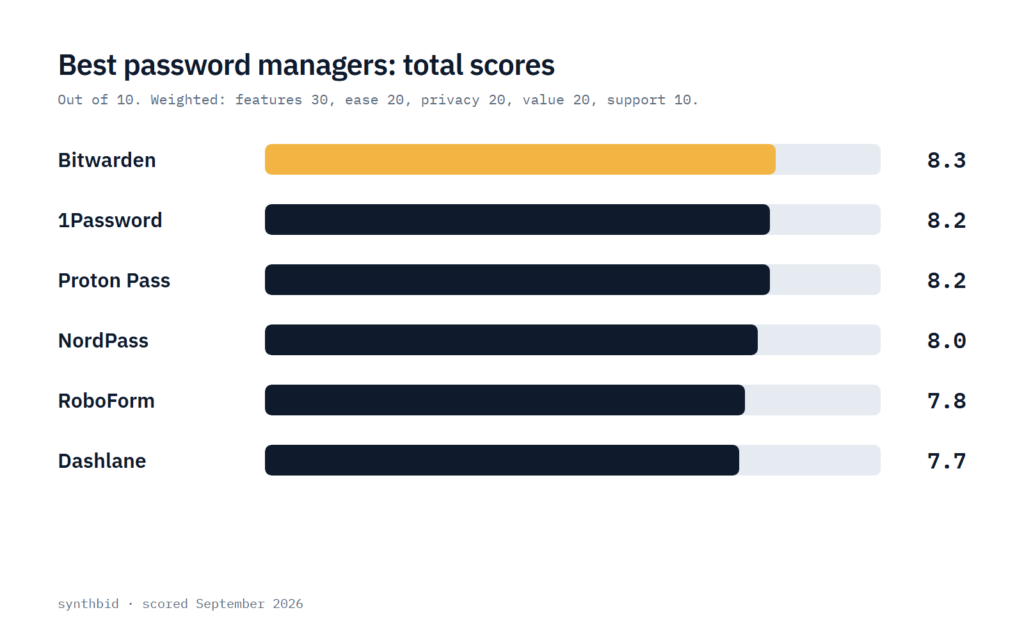
Six password managers are scored here on the checklist behind every ranking on this site. Core features carry 30 points, ease of use and value 20 each, privacy and data 20, and support 10, as set out on How I test. I picked the six with enough published material to say plainly what each offers and costs, and left the rest for the short list near the end.
Two of the big review lists put NordPass first: it is PCMag’s Editors’ Choice for paid managers and TechRadar’s best overall pick. My checklist gives free plans and low prices more weight than polish, which is why it lands fourth here, and the NordPass entry explains the gap.
The ranking at a glance
| Password manager | Score | Price | Best for |
|---|---|---|---|
| 1. Bitwarden | 8.3 | Free, Premium $19.80/yr | A free vault on every device, with a cheap paid plan |
| 2. 1Password | 8.2 | $2.99/mo in year one, then $3.99/mo | Polish and family sharing, if you accept the price |
| 3. Proton Pass | 8.2 | Free, Plus $2.99/mo | Free email aliases and a privacy-first company |
| 4. NordPass | 8.0 | Free, Premium $1.39/mo (27-month plan) | Low long-plan pricing and a modern app |
| 5. RoboForm | 7.8 | Free, Premium $2.49/mo | A low-cost paid plan and mobile use |
| 6. Dashlane | 7.7 | $4.99/mo in reviews, no free plan | A built-in VPN, if you will pay for it |
Prices are from each company’s own pricing page, checked September 2026, except Dashlane, whose personal prices come from reviews. 1Password’s lower price is a first-year promotion. 1Password and Proton Pass tie on total, and I put 1Password first because it scores higher on core features and ease of use.
Bitwarden: the free plan to beat
Bitwarden is where I would start if you have never paid for a password manager. The free plan stores unlimited passwords on unlimited devices through apps for browsers, phones and desktops, and it also covers passkey management and email alias integration. The pricing page lists open source code and zero-knowledge encryption among the core features of every account.
Premium is $19.80 a year, billed annually, and its extras are a built-in authenticator, file storage, emergency access and security reports. Families covers up to 6 users for $47.88 a year. Two of the reviews I read still quote $10 a year for Premium, while another says the price has increased significantly, so go by the official page.
The compromise is polish and help. One review calls the interface bare-bones and says it occasionally struggles to capture and fill logins and needs more manual setup, while another lists support and the desktop clients as weaker points. The pricing page mentions 24/7 email support for everyone and nothing about chat or phone, which is why support scores lowest. My Bitwarden review goes through the limits of the free tier.
Why 8.3. I give core features 8.5 for a full free vault, passkeys, aliases and a self-hosting option, held back because the authenticator and security reports are paid. Ease of use gets 7.5 for the plain interface and the manual setup. Privacy gets 9.0 because the code is open source, the encryption is zero-knowledge and self-hosting keeps the vault on your own server if you want that. Value gets 9.0 for a usable free plan and a $19.80 paid plan, and support gets 6.5.
Scores: core 8.5, ease 7.5, privacy 9.0, value 9.0, support 6.5. Total 8.3.
1Password: the most polished, at a price
I would choose 1Password if you or your family will share logins and care about how an app feels. Reviewers describe easy-to-navigate apps on every platform and a browser extension that shows phishing alerts, and the pricing page lists Watchtower alerts for weak and compromised passwords, secure sharing and apps for macOS, iOS, Windows, Android and Linux.
There is no free plan, only a 14-day free trial. Individual is $2.99 a month billed annually for new customers in their first year, against a regular $3.99 a month, and Families is $4.49 against $5.99, with up to 5 family members. The regular price works out at $3.99 × 12 = $47.88 a year, and one review says the price has increased substantially since last year.
The reviews name other limits. One lists no digital legacy option and masked emails as a paid add-on, and another says support runs through email, a forum and social media with no live chat, and that the Premium plan has no guest sharing. On the other side, the pricing page names a Secret Key and Travel Mode as extra security features. My 1Password vs Bitwarden comparison goes through the choice between the two.
Why 8.2. I give core features 9.0 for Watchtower, secure sharing, Travel Mode and the Secret Key, which together cover more than basic storage. Ease of use gets 8.5 for apps reviewers find easy to navigate, held back by a review that calls online logins a faff. Privacy gets 8.5 for end-to-end encryption plus the Secret Key, though the saved sources say little about audits. Value gets 6.5 because there is no free plan and the promotional price lasts one year. Support gets 8.0: the pricing page promises help from a global team and a review lists email, a forum and social media, but there is no live chat.
Scores: core 9.0, ease 8.5, privacy 8.5, value 6.5, support 8.0. Total 8.2.
Proton Pass: the free plan with aliases
Proton Pass has the best free plan after Bitwarden’s, and it comes from a company built around privacy. Free covers unlimited logins, notes and credit cards on unlimited devices, passkeys, alerts for weak and reused passwords and 10 hide-my-email aliases, a feature that one review says other companies usually reserve for paid accounts.
Plus is shown at $2.99 a month after a 40% discount from $4.99, billed at $35.88 every 12 months, and adds unlimited aliases, a built-in authenticator, vault and link sharing, dark web monitoring, file attachments and emergency access. Family is $4.99 a month for up to 6 users. One review lists Plus at $1.99 a month, which does not match the page, so I would go by the official figure and confirm it at checkout.
The weak spots are support and age. One review says support runs through a form with email replies and no live chat, and another notes that Proton Pass is a relative newcomer next to older managers, which means a shorter record to judge. Proton Unlimited at $9.99 a month adds Mail, Calendar, VPN and Drive, and if the VPN is what interests you, my Proton VPN review covers that side.
Why 8.2. I give core features 8.5 for a generous free plan and the Plus extras such as aliases, the authenticator and Proton Sentinel. Ease of use gets 8.5 because reviewers praise smooth form filling and clean mobile apps. Privacy gets 8.5 for end-to-end encryption and Swiss jurisdiction as Proton describes them, held back by a shorter track record than older rivals. Value gets 8.0, since $35.88 is well above Bitwarden’s $19.80, and support gets 6.5.
Scores: core 8.5, ease 8.5, privacy 8.5, value 8.0, support 6.5. Total 8.2.
NordPass: the reviewers’ favorite, ranked on my checklist
NordPass is the manager both big review lists put at or near the top, and the praise is specific: sharing options that are easy to grant and revoke, breach scans, password health tools and emergency access in one modern app. It is a good choice if you want to pay a low price and do not need a generous free plan.
The official page lists Premium at $1.39 a month on the long plan, billed as $37.53 for the first 27 months, and Family at $2.49 a month for 6 accounts, $67.23 for 27 months. Both carry a 30-day money-back guarantee. The page does not show what either costs after the first term, and one review quotes $1.58 a month on a one-year plan, so check the renewal before you pay.
The free plan is limited to one device at a time according to two reviews, and the plan list on the pricing page does not show multi-device access for it. A third review says sign-in needs two separate passwords, one for the Nord account and one for the vault, and one review calls the extra breach scanning somewhat risky because a third-party service processes the data. The company is the one behind NordVPN, which my NordVPN review covers.
Why 8.0. I give core features 8.5, since the breach scanner, health tools and attachments are there but the Premium list marks the NordPass Authenticator as not included. Ease of use gets 8.0 for a modern interface offset by the two-password sign-in. Privacy gets 7.5 because of the third-party processing flag. Value gets 8.0 for a low long-plan price with no stated renewal and a limited free plan. Support gets 7.5 for the 24/7 live support one review lists.
Scores: core 8.5, ease 8.0, privacy 7.5, value 8.0, support 7.5. Total 8.0.
RoboForm: a cheap paid plan
RoboForm is for people who want a paid plan without paying much. The official page lists Premium at $2.49 a month billed annually, which is $2.49 × 12 = $29.88 a year, with access on all devices, web access, emergency access, data breach monitoring and a local-only mode that keeps data on your device.
Reviews quote lower promotional prices, for example $19.92 for the first year in one, so ask what the plan costs once the promotion ends. Family is $3.98 a month for 5 premium accounts, and a 30-day refund window covers both plans.
The free plan is the weak point: it gives unlimited passwords on a single device, with a TOTP authenticator and cloud backup, but one review says free users get no syncing or web access, and another calls the free plan restrictive. Reviews also split on the interface. One calls it unintuitive, while another picks it as best for beginners because of its tutorials and in-app tips.
Why 7.8. I give core features 8.0 for autofill, breach monitoring, emergency access and the local-only mode. Ease of use gets 7.5 because the reviews disagree. Privacy gets 8.0 for a zero-knowledge design and local-only storage, and value gets 8.0 for the low price, held back by the restrictive free plan. Support gets 7.0, since priority 24/7 support is listed for paid plans only.
Scores: core 8.0, ease 7.5, privacy 8.0, value 8.0, support 7.0. Total 7.8.
Dashlane: feature-heavy and the dearest
Dashlane is the most feature-heavy plan here and the most expensive. Premium adds a VPN, phishing alerts and dark web monitoring to unlimited storage for passwords and passkeys, and one review picks it as the best overall. If the VPN is the draw, compare it with the services in my ranking of the best VPNs first.
The saved Dashlane pricing page covers business plans only, at $8 per user a month for Password Management with a 14-day free trial, so the personal prices come from reviews. One lists Advanced at $33 a year ($2.75 a month), Premium at $59.88 a year ($4.99 a month) and Friends and Family, for up to 10 accounts, at $89.88 a year ($7.49 a month). Reviews also report that the free plan has been discontinued.
Other limits are listed too. One review calls the premium plan expensive and the passwordless login clunky, another says two-factor authentication works only through the app, with no SMS or biometric option, and on the Family plan only the admin gets the VPN. A buying guide also mentions breaches at Dashlane and LastPass, where the attackers walked away with encrypted data.
Why 7.7. I give core features 9.0 for the VPN, phishing alerts, dark web monitoring, passkeys and autofill, which is a broad set. Ease of use gets 8.0 because reviewers find it easy to use, offset by the clunky passwordless login and narrow two-factor options. Privacy gets 7.5, since the breach mention counts against it even though the stolen data is described as encrypted. Value gets 6.0 for the highest single-user price and no free plan. Support gets 7.0, because the saved sources say little about personal-plan support.
Scores: core 9.0, ease 8.0, privacy 7.5, value 6.0, support 7.0. Total 7.7.
Free or paid: what the plans leave out
Only two of these give you a free plan I would call complete: Bitwarden and Proton Pass, both with unlimited devices. NordPass and RoboForm free plans cover a single device. Dashlane has no free plan, and 1Password offers only its 14-day trial.
What the paid plans add is fairly consistent. Paying for Bitwarden Premium buys an authenticator, file storage, emergency access and security reports, while Proton Plus adds unlimited aliases, dark web monitoring and sharing. If you already have an authenticator app and nobody to share logins with, I would stay on a free plan from Bitwarden or Proton Pass and spend nothing.
Families change the sum. Bitwarden Families covers 6 users at $47.88 a year and Proton Pass Family covers 6 at $59.88, while 1Password Families allows 5 family members at $4.49 a month in the first year and $5.99 after. The family price per person is the number I would compare, and every figure here is taken from an official page.
Not ranked
Keeper is the clearest case. Its personal page lists a free plan limited to one mobile device and ten records, Keeper Unlimited at $3.58 a month ($42.99 billed annually) and Family at $7.67 a month ($91.99 billed annually). One review ranks it third but says it has no free plan, which does not match the page, so I have not scored it.
LastPass splits the reviews. PCMag still lists it and calls its interface the best, while TechRadar and PCWorld both left it out after the 2022 breach, and PCWorld adds that its export is unreliable. Enpass, which stores data locally or on your own cloud, and KeePass, which is free and needs technical skill, are the two options for people who do not want a cloud vault at all.
Pricing
| Plan | Price | Billed | Notes |
|---|---|---|---|
| Bitwarden Premium | $1.65/mo | $19.80 annually | Free plan available |
| Bitwarden Families | $3.99/mo | $47.88 annually | Up to 6 users |
| 1Password Individual | $2.99/mo in year one, $3.99/mo regular | Annually | 14-day free trial |
| 1Password Families | $4.49/mo in year one, $5.99/mo regular | Annually | Up to 5 family members |
| Proton Pass Plus | $2.99/mo | $35.88 every 12 months | 30-day money-back guarantee |
| Proton Pass Family | $4.99/mo | $59.88 every 12 months | Up to 6 users |
| NordPass Premium | $1.39/mo | $37.53 for the first 27 months | 30-day money-back guarantee |
| NordPass Family | $2.49/mo | $67.23 for the first 27 months | 6 accounts |
| RoboForm Premium | $2.49/mo | Annually | 30-day money-back guarantee |
| Dashlane Premium | $4.99/mo (reviews) | $59.88 a year (reviews) | No free plan |
Prices from each company’s pricing page, checked September 2026. Dashlane’s figures come from the published reviews linked in Sources.
FAQ
What is the most trusted password manager?
None of the saved sources ranks managers by trust, so this is my judgement. On my privacy scores Bitwarden is highest at 9.0, with open source code and zero-knowledge encryption listed on its pricing page, and 1Password and Proton Pass follow at 8.5. A long master password and two-step login matter as much as the brand.
Which password managers have never been hacked?
I cannot give you a certified clean list. A buying guide mentions breaches at Dashlane and LastPass, and another review says LastPass suffered a major breach in 2022. The saved sources mention no breach for the other four, which is not proof of a clean record. Zero-knowledge designs keep a stolen vault encrypted, so a strong master password is what protects you.
Why avoid Google Password Manager?
I would not say avoid it, but the sources give two reasons to look beyond a browser’s built-in manager. One explains that a desktop with Chrome and an iPhone ends up with two managers that do not sync, because app passwords go to Apple’s Keychain and website passwords go to Chrome. Another says Bitwarden’s free plan beats the built-in Google and Apple managers on features.
Is a free password manager good enough?
For most people, yes, if it is Bitwarden or Proton Pass, since both cover unlimited devices. The NordPass and RoboForm free plans cover one device, so they suit someone who only logs in from a single phone or laptop. If you want an authenticator, emergency access or shared vaults, that is when I would pay.